Campaign Participation Options in the New Interface
The redesigned Campaigns interface makes it easier to manage your campaign participation and allows you to choose the method that best suits your business.
You can browse available campaigns, check submission deadlines, and track campaign statuses.
Campaign participation is free of charge, and your commission remains unchanged throughout the campaign. The only participation requirement is that the submitted products meet the campaign’s minimum discount requirement, calculated against the lowest price in the 30 days preceding the campaign start date.
Table of contents
Where can you find the campaigns?
Log in to Pepita Admin, then navigate to My Opportunities → Campaigns and find the campaign you want to join.
The campaign cards display the most important information, such as the campaign period, submission deadline, and number of eligible products.
You can use the filters to easily distinguish between campaigns you have already joined, campaigns you can still join, upcoming campaigns, and expired campaigns.

How can you join a campaign?
The redesigned interface offers three ways to submit your products to a campaign. Choose the option that best fits your product portfolio and pricing needs.
1. One-click participation
We recommend this option if you want to participate in a campaign with all your active products available in the selected market, applying a uniform discount. You can also join at the main (supra) category or category level, including with different discounts.
Once you have selected the products and set the discount, you can start the submission process with a single submission. You can select multiple markets if you want to apply the same discount across them.

Find the detailed instructions here:
2. Product-by-product pricing
If you want to participate in a campaign with only selected products or apply different discounts to individual products, choose product-by-product pricing.
In the interface, you can search and filter your products, select the offers you want to submit to the campaign, and then set and review their discounts and campaign prices. The system also identifies products with issues before submission.
Products that have already been submitted can also be modified in this interface until the submission period closes.
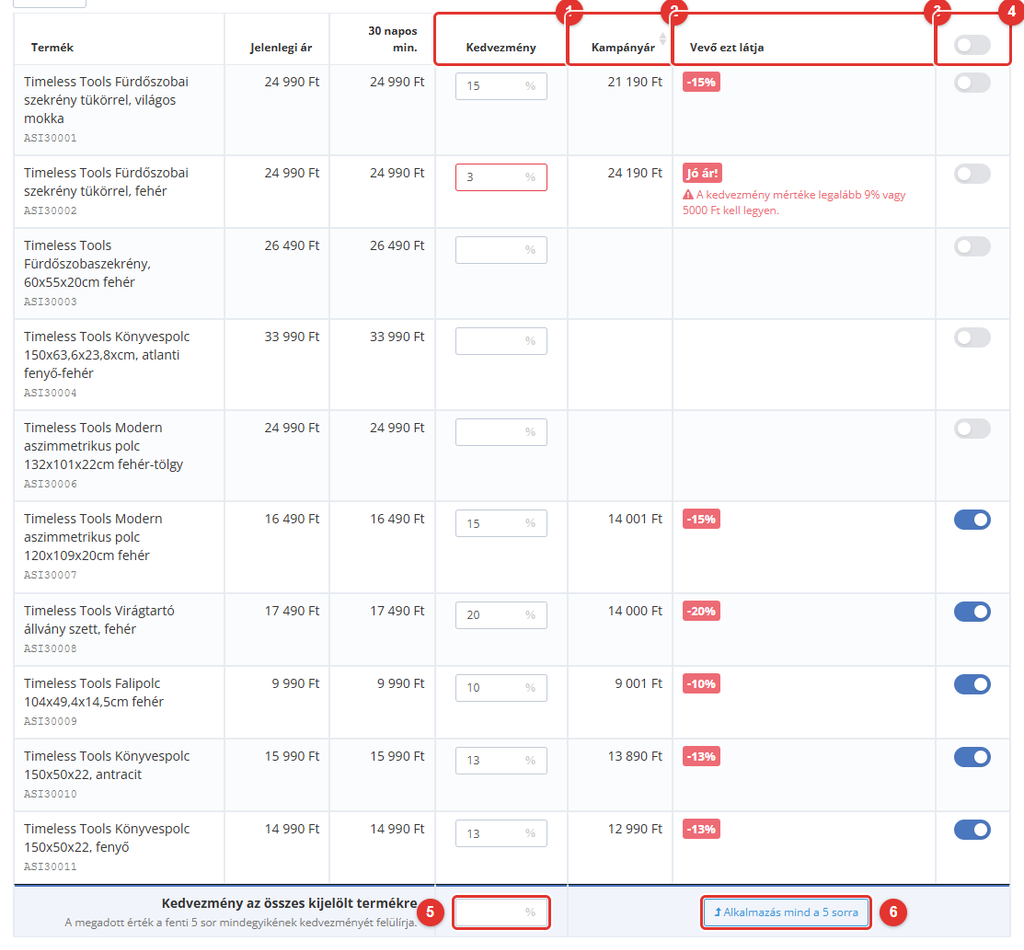
Find the detailed guide here
3. Excel-based participation
If you prefer to prepare the list of campaign products and their discounts in a spreadsheet, you can still use the traditional Excel-based submission method.
You can download the product list for the selected market, fill in the discount column, and upload the modified file. Make sure to edit only the specified fields and include every product you want to participate in the campaign.

Find the detailed instructions here:
Important information before joining a campaign
- Check the submission deadline! You can submit products to a campaign only during the specified period.
- Read and accept the participation terms! Accepting the terms is a prerequisite for joining the campaign.
- Check your products’ eligibility! Products must meet the campaign requirements to participate. Their prices must have at least 15 days of price history.
- Pay attention to the discount amount! The campaign discount is calculated based on the lowest selling price in the 30 days preceding the campaign start date. The campaign’s minimum discount requirement must also be met.
- Check the confirmations! After submitting your products, review the system messages and email notifications so you can correct any issues with your products if necessary.
- You can join campaigns only in markets where you have active products. To open a new market, visit: https://admin.pepita.hu/international-sales.
- In countries where automatic pricing applies, we set the campaign prices based on the base country, so you do not need to join the campaign separately for those countries.
Choose the participation method that works best for you and prepare your products for the campaign in advance!
If you have any questions, please contact Seller Support at [email protected].epita.hu.