Product upload, product documentation and stock updates, order synchronisation with UNAS API
With UNAS API connection, the following processes are possible
- Product upload
- Product documentation update (product name, description, images, price)
- Stock update
- Order synchronisation

Hourly documentation and stock updates are available by establishing an API connection.
Order synchronisation is a one-way communication, which means that we send orders to your online store account, but there is no possibility to synchronise them back. So orders need to be managed manually (close, change status, reconcile commission) within the Pepita Admin interface.
How to set
After logging in to your UNAS account, click on “External contacts” in the “Settings” menu and then on “Marketplaces”.
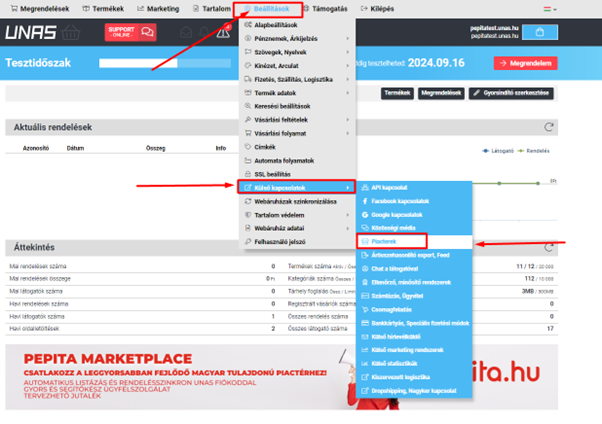
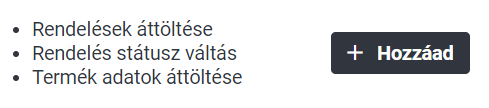
Scroll down to Pepita and add the module.
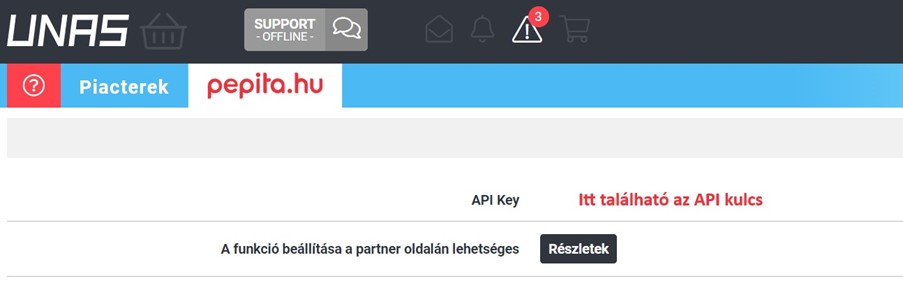
Copy and paste the “API Key” and send it to your dedicated contact by email or to [email protected] or by clicking on the “Partner support” button in the Pepita Admin interface.
We also need the following information to send orders automatically.
- the exact name and identification of the payment method (bank transfer, cash on delivery, credit card)
- delivery method and identifier (used to send orders to UNAS)
We recommend that you take screenshots to avoid any typos.
If you happen to have any further questions do not hesitate to contact us!
[email protected]
The Pepita Group team
